Game Guide
Learn to Play Age of Space - Complete beginner's guide to Age of Space. Learn how to build, attack, spy, colonize, and dominate the galaxy!
Welcome to Space!
Ready to become a space commander? This comprehensive guide will teach you everything you need to know to build, explore, and conquer the galaxy!
What is Age of Space?
Age of Space is a free-to-play, browser-based multiplayer strategy game set in the depths of outer space. Inspired by classic space strategy titles, it challenges you to build and manage your own galactic empire from a single planet.
Unlike traditional games that require constant attention, Age of Space is a persistent-world game. Your mines produce resources, your fleets travel, and your research progresses even when you're offline. This makes it perfect for players who can only check in a few times per day.
You share the universe with thousands of other players. You can trade, form alliances, wage war, or focus entirely on building the most powerful economy. There is no single "right way" to play — your strategy is up to you.
Each universe has its own settings: game speed, fleet speed, debris ratios, and more. This means every universe offers a slightly different experience.The Core Game Loop
Everything in Age of Space follows a simple loop that gets deeper as you progress:
- Build mines to produce Titanium, Graphene, and Deuterium
- Use resources to construct buildings that unlock new capabilities
- Research technologies to improve your empire's efficiency and power
- Build ships to explore the galaxy, transport resources, and fight
- Colonize new planets to multiply your production and reach
- Form or join alliances to protect yourself and coordinate with others
As you grow, you'll face choices: invest in economy for long-term growth, or build a fleet for immediate power? Defend your planets heavily, or rely on fleet-saving techniques? These decisions define your play style.
Understanding the Game Interface
When you first enter the game, you'll see your planet surface — a grid where your buildings will appear as you construct them. Let's break down the main areas:
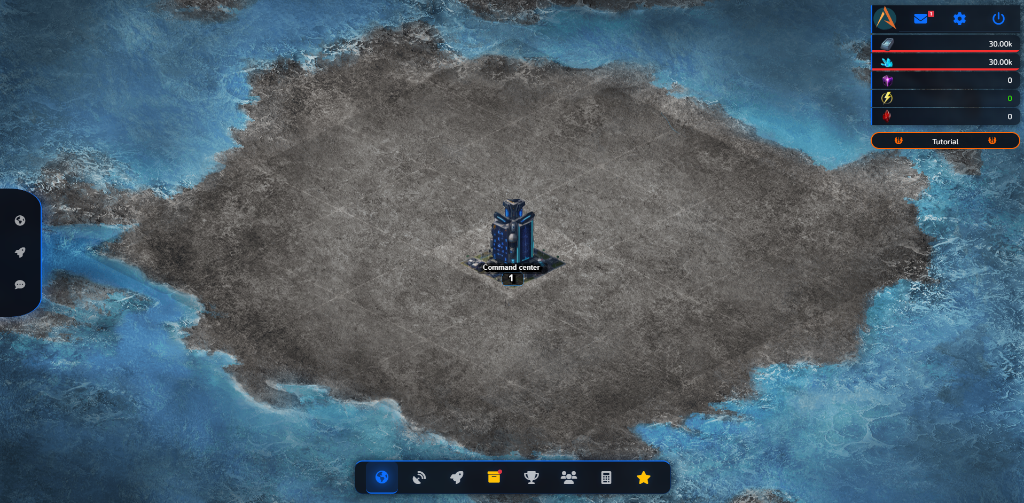
- Resource Bar (Top): Shows your current resource amounts and production rates. The numbers update in real-time as your mines produce.
- Sidebar (Left): Lists all your planets and any active fleet movements. Click a planet to switch to it. Fleet countdowns show exactly when your ships will arrive.
- Planet Surface (Center): The main area shows your planet surface. Click empty slots to build, or click existing buildings to upgrade or interact with them.
- Navigation Dock (Bottom): The navigation dock at the bottom gives quick access to all game features: Fleet page, Galaxy Map, Alliance, Messages, Reports, Rankings, and more.
Your First Steps as Commander
When you start, you have one planet with a Command Center already built. Here's what to do in your first session:
- Name your planet — click the planet name at the top to change it from "New Planet" to something memorable.
- Build a Titanium Mine — click an empty grid slot and select the Titanium Mine. This is your first source of income.
- Build a Solar Plant — mines need energy to operate. Without enough energy, production drops dramatically.
- Build a Graphene Mine — your second resource. Many buildings and ships require both Titanium and Graphene.
- Follow the Tutorial — the in-game tutorial guides you through 21 steps with rewards at each milestone.