Game Guide
Learn to Play Age of Space - Complete beginner's guide to Age of Space. Learn how to build, attack, spy, colonize, and dominate the galaxy!
The Galaxy Map
The Galaxy Map is your window into the universe. It shows you every planet, player, alliance, and empty slot across all galaxies. Learning to read the map efficiently is essential for finding raid targets, choosing colony locations, and understanding your neighborhood. This chapter explains the coordinate system, position effects, player status icons, and how to use the map strategically.
Galaxy Structure
The universe in Age of Space is organized into a three-level hierarchy: Galaxies, Systems, and Positions. Understanding this structure is fundamental to navigation, fleet planning, and colony placement.
The universe contains 9 galaxies. Each galaxy has 499 solar systems. Each solar system has 15 planet positions. This means there are a total of 9 x 499 x 15 = 67,365 possible planet positions in the entire universe.
Every location is identified by coordinates in the format [Galaxy:System:Position]. For example, [1:100:8] means Galaxy 1, System 100, Position 8. You will use these coordinates constantly when sending fleets, spying, and communicating with other players.
Navigating the Map
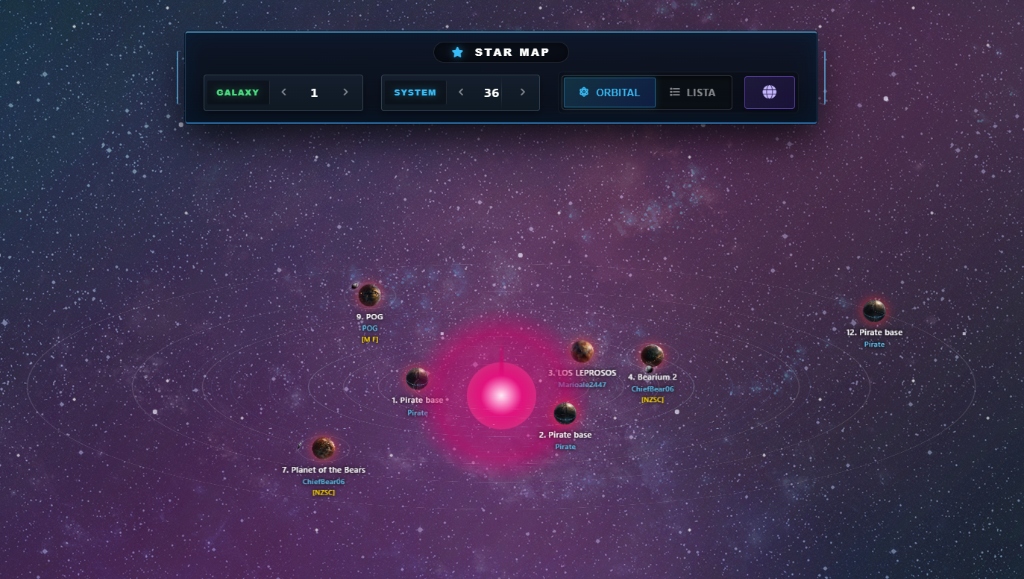
The Galaxy Map shows one solar system at a time. You see all 15 positions in the current system, with information about each occupied planet.
To navigate between systems, use the arrow buttons or type a specific galaxy and system number directly. You can also click on planets to see more details about the owner.
The map has two view modes: orbital view (showing planets visually around a star) and list view (showing a compact data table). List view is more information-dense and preferred by experienced players.
Reading Planet Information
Each occupied position on the Galaxy Map displays several pieces of information:
- Position number (1-15) — the planet's slot in the solar system
- Planet name — the name set by the owner
- Player name — who owns this planet
- Alliance tag — shown in brackets like [TAG] if the player is in an alliance
- Activity indicator — shows recent player activity (star icon or minutes since last action)
- Moon icon — appears if the planet has a moon
- Debris field — appears if there are resources floating in orbit from recent battles
Player Status Icons
Players can have special status indicators next to their name. Understanding these is critical for knowing who you can attack and who to avoid:
| (i) | (i) Inactive — Player has not logged in for 7+ days. Safe to attack. Resources accumulate but fleet and defenses do not grow. |
| (I) | (I) Long Inactive — Player has not logged in for 28+ days. Very safe target. May have accumulated large resource stocks. |
| (n) | (n) Newbie — New player under protection. You cannot attack them if you are significantly stronger, and they cannot attack you. |
| (s) | (s) Strong — Powerful player. If you are a newbie, you are protected from them. Attacking them as a newbie is risky. |
| (v) | (v) Vacation Mode — Player is on vacation. Cannot be attacked, cannot attack. Their planet is completely safe. |
| (a) | (a) Admin/Banned — Game administrator or banned player. Do not interact. |
Activity Indicators
The activity indicator tells you how recently a player was active on a specific planet:
- A star icon means the player was active within the last 15 minutes. Do NOT attack — they are online and will likely see your fleet coming.
- A number (like "37") means the player was last active that many minutes ago. Activity fades after 60 minutes.
- No activity indicator means the player has not been active on that planet for over 60 minutes. This is when it is safest to attack.
Position Effects
The position of a planet within its solar system affects its temperature, which in turn affects Deuterium production and Solar Plant efficiency:
| 1-3 | Positions 1-3 (Hot): Highest temperature. More solar energy production but less Deuterium. Good for energy-hungry economy planets. |
| 4-6 | Positions 4-6 (Temperate): Balanced temperature. Moderate solar energy and Deuterium. Best all-around positions. Also tend to have the most fields (building slots). |
| 7-9 | Positions 7-9 (Cool): Cooler temperatures. Good Deuterium production with reasonable solar energy. Solid general-purpose positions. |
| 10-12 | Positions 10-12 (Cold): Cold temperatures. High Deuterium production but less solar energy. Good for Deuterium-focused colonies. |
| 13-15 | Positions 13-15 (Extreme Cold): Coldest temperatures. Best Deuterium production but lowest solar energy. Ideal for dedicated "Deuterium farms" but require more energy infrastructure. |
When colonizing, consider what role each planet will play. Your main planet should ideally be in positions 4-6 for maximum fields, while Deuterium farms benefit from positions 13-15.