Game Guide
Learn to Play Age of Space - Complete beginner's guide to Age of Space. Learn how to build, attack, spy, colonize, and dominate the galaxy!
🗺️ The Galaxy Map
The galaxy is huge! Learn how to explore and find other players.
How to Navigate
The galaxy is organized into: Galaxies → Solar Systems → Positions
Use the arrows or type coordinates to move around.
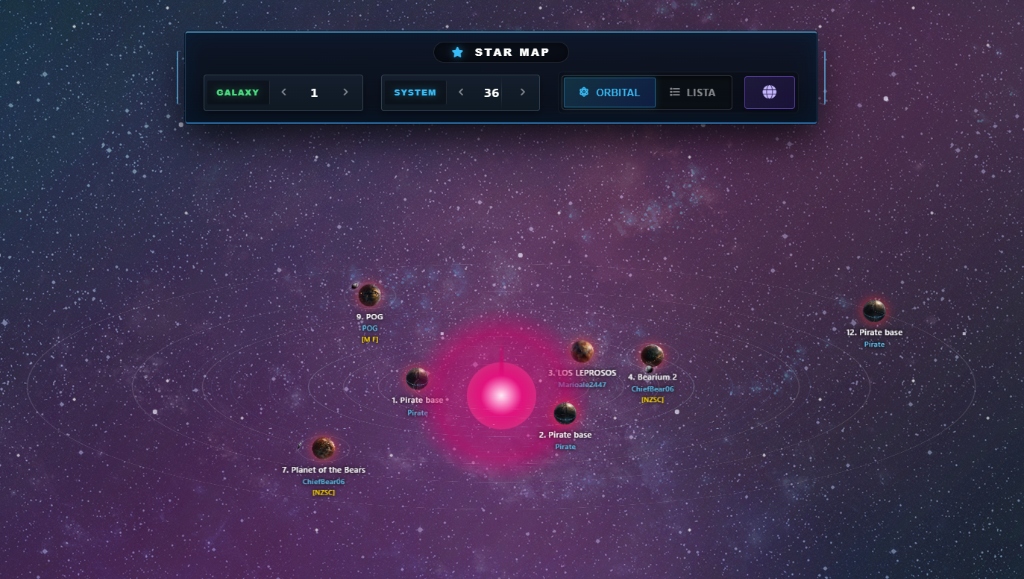
Navigation Controls
- GALAXY: Switch between different galaxies (1, 2, 3...)
- SYSTEM: Navigate through solar systems (1-499)
- ORBITAL / LISTA: Toggle between orbital view and list view
What You'll See
🌍
Planets
Planets - Other players' planets. Click to see info.
⬜
Empty Positions
Empty positions - You can colonize here!
💎
Debris Fields
Debris fields - Resources floating in space after battles.
🌑
Moons
Moons - Special companions to planets.
Reading Planet Information
Each planet in the map shows important information:
- Position number - e.g. "1.", "2.", "7." (position in the system)
- Planet name - e.g. "Planet of the Bears", "POG"
- Player name - Who owns the planet
- Alliance tag - Shows in brackets like [NZSC], [POG]
- Status icons - (i) inactive, (v) vacation, etc.
Player Status Icons
●
Active Player
No icon = Active player (be careful!)
(i)
Inactive
"i" or "I" = Inactive player (safer to attack)
(v)
Vacation
"v" = Vacation mode (can't attack)
🛡️
Protected
Newbie protection = New player (can't attack)
Tip
Inactive players (marked with "i") are usually safe targets for attacks - they haven't logged in for a while!
Pirate Bases
Some positions show "Pirate base" - these are NPC targets you can attack for resources. They respawn over time!